Skip the reading
Open the PNG → AVIF converter
No watermark, no upload, no account. Runs in your browser.
WebP replaced JPG and PNG as the sensible default for most web images years ago. Now AVIF is pushing further - smaller files, HDR support, better quality at the same size. The question in 2026 is not whether AVIF is better on paper (it is), but whether those gains are worth the trade-offs for your specific situation.
This guide cuts through the noise: a direct comparison of AVIF and WebP across the things that actually matter, and a clear recommendation for when to use each.
TL;DR
- AVIF is typically 20-30% smaller than WebP at similar quality - a real advantage for large photos.
- AVIF encodes 5-15x slower and is more demanding on tooling.
- Use AVIF for your biggest, most-viewed images (hero images, above-the-fold photos).
- Default to WebP everywhere else - it’s fast, supported everywhere, and still beats JPG by 25-35%.
AVIF vs WebP at a glance
| Feature | WebP | AVIF |
|---|---|---|
| Compression efficiency | Good - 25-35% smaller than JPG | Excellent - 20-30% smaller than WebP |
| Transparency (alpha) | Yes | Yes |
| Animation | Yes | Yes (limited tooling support) |
| Encode speed | Fast | 5-15x slower than WebP |
| Browser support (2026) | ~99% - supported since 2020 | ~95% - supported since Safari 16 |
| Best for | Default for all web images | Large hero photos, HDR images |
Where AVIF wins
The headline number is real: AVIF images are typically 20-30% smaller than WebP at equivalent visual quality. On a 1.2 MB WebP hero image, that might mean 350-400 KB saved on every page load. Multiply that across millions of page views and the CDN bill and Core Web Vitals scores both look better.
AVIF also supports HDR and wide color gamut (Display P3, Rec. 2020) - something WebP cannot do. If you’re serving photography or product images on a device with an HDR display, AVIF can show more accurate colors and luminance range.
For large, high-detail photos - full-width backgrounds, editorial photography, e-commerce product shots - AVIF gives you the best possible quality-to-bytes ratio of any format shipping in browsers today.
Where WebP still wins
Encode speed is the big one. WebP encodes in milliseconds; AVIF can take several seconds per image at high quality. If you’re running an on-the-fly image resizing service, a large build pipeline, or just batch converting thousands of images, that difference compounds. WebP is the practical format when encode throughput matters.
WebP also has a longer track record. It’s been the de facto standard since around 2020, tooling support is rock-solid, and essentially every CDN, CMS, image service, and browser handles it without configuration. AVIF tooling has matured a lot, but edge cases still crop up in older WebView environments and some image processing libraries.
For animated images, animated WebP is more widely supported in tools and CDNs than animated AVIF sequences. For anything short and looping, WebP or video (MP4/WebM) remains the practical choice.
The 2026 verdict
WebP is still the correct default. For the vast majority of images on the web - thumbnails, UI graphics, compressed photos in feeds, anything below the fold - WebP is simpler, faster to produce, and supported on every device.
AVIF earns its place for your biggest and most performance-sensitive images: full-width hero photos, large editorial images, anything that a Lighthouse audit flags as a significant byte contributor. The 20-30% size reduction is a genuine page-speed win at that scale, and browser support in 2026 is close enough to universal that a <picture> element fallback handles the remaining gap with almost no extra work:
<picture>
  <source srcset="hero.avif" type="image/avif" />
  <source srcset="hero.webp" type="image/webp" />
  <img src="hero.jpg" alt="Your image description" />
</picture>
Serve AVIF to the browsers that support it, WebP to the rest, and JPG as the final fallback. That’s the 2026 stack.
Convert PNG or JPG to AVIF or WebP
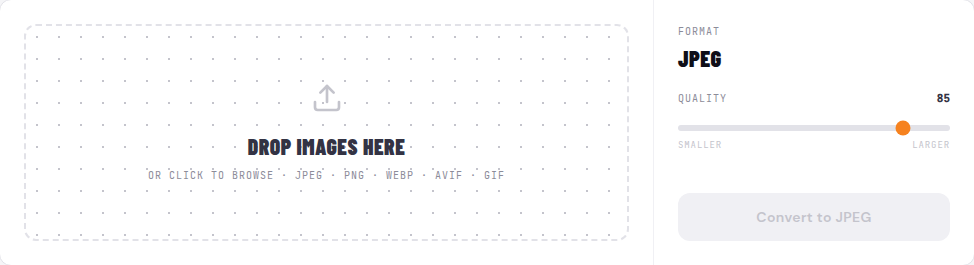
All three converters run entirely in your browser - nothing is uploaded, no account required, free. Drop your image, adjust the quality slider (default 85 is visually lossless for most photos), and click Convert.
- PNG to AVIF - converter.encodehive.com/png-to-avif
- JPG to AVIF - converter.encodehive.com/jpg-to-avif
- PNG to WebP - converter.encodehive.com/png-to-webp
The image drop zone accepts JPEG, PNG, WebP, AVIF, and GIF. Drop one file or several - the converter queues them and processes each in turn. When a file is done you’ll see its new size and a green -NN% badge showing how much smaller it got. Click Save to download, then Clear done to tidy the list.
You can confirm the conversion is truly local by enabling Airplane Mode after the page loads - it still works offline, because there is no server involved.
Related guides
FAQ
Frequently asked
Is AVIF worth it in 2026?
For large hero images and photos where file size is critical, yes. AVIF is typically 20-30% smaller than WebP at similar quality, which translates to real page-speed gains on big images. For the rest of your image library - thumbnails, icons, UI assets - WebP is usually the better call because it encodes much faster and is universally supported without any tooling hassle.
Is AVIF better quality than WebP?
At the same file size, AVIF generally preserves more detail, especially in smooth gradients, skin tones, and high-frequency textures. It also supports HDR and wide color gamuts that WebP does not. That said, at the quality settings most sites use (80-90), both look excellent and the difference is subtle. AVIF's real edge is compression efficiency, not a dramatic visual improvement.
What is AVIF browser support in 2026?
AVIF is supported in Chrome, Edge, Firefox, and Safari as of Safari 16 (late 2022). In 2026 global browser support sits above 95%, so the compatibility gap with WebP has largely closed. The remaining edge cases are older WebView instances in some mobile apps. A <picture> element with a WebP fallback covers everything safely.
How much slower is AVIF to encode than WebP?
Encoding AVIF is typically 5-15x slower than encoding WebP at comparable quality settings. A WebP that encodes in 200ms might take 1-3 seconds as AVIF. For images you pre-generate offline or at build time this is rarely a problem. For on-the-fly image resizing at scale, the extra CPU cost adds up and WebP is the more practical choice.
Does AVIF support transparency and animation?
Yes to both. AVIF supports an alpha channel (transparency) just like WebP and PNG, and it supports animation (AVIF sequences). In practice, animated AVIF files are not yet widely supported by editing tools and CDNs, so animated WebP or regular video formats are still the safer choice for animations. For static images with transparency, AVIF works well.
Can I convert JPG or PNG to AVIF without losing quality?
AVIF is a lossy format by default, so some information is discarded - but at quality 80 or above the output is visually indistinguishable from the source for most photos. Converting from a high-quality original JPG or PNG to AVIF at quality 80-90 gives you a smaller file with no visible degradation. The browser-based converter at converter.encodehive.com/png-to-avif runs entirely on your device, so nothing is uploaded.